Organizing Computer Files - How To Clean Up Your Desktop & Be Able To Retrieve Files Easily
This post may contain affiliate links. This means if you click on the link and purchase
the item, I will receive an affiliate commission. More here: Disclaimer & Privacy Policy
Organizing computer files is essential in this day and age! Here's how to organize computer files so that you can find anything in a minute or less!
Like emails, having orderly computer files is vital in this technology-driven day and age.
With the easy accessibility consumers have to their accounts on the internet, our growing desire to lessen overwhelming paper clutter and our improving efforts to preserve the planet, organizing your computer files will boost every day efficiency at home and at work.
Who doesn't want that?!
Check out the following tips on how to organize computer files to get started.

Organizing Computer Files: The Process
Utilize the general organizing procedure of purge, sort and store, and apply it to organizing computer files.
PURGE:
• Start by going through your computer files one at a time and delete all duplicates, unwanted and/or unnecessary documents.
• In order to complete this step, ask yourself appropriate questions. For example: Is this a duplicate? Can I get this elsewhere if I need it? Is it outdated or expired?
• Organizing
computer files can be tough when it comes to making decisions on
financial documents. Check out Real Simple's website for
guidelines on record keeping.
• Remember, this can
take some time, especially if you have a lot of electronic documents. If
that is the case, go through your files for a set amount of time (say
half an hour) and then stop. Do this every day until the job is done.
Small achievable tasks are more likely to get done rather than a large
daunting pile of digital clutter!
• When you are done purging, don't forget to Empty Your Trash! When the garbage cans in your home or office are full you empty them, right?
Don't forget to do this for your computer.
When you send files to the trash, they still take up memory because they are still on your computer and haven't been permanently deleted.
Empty
your computer's trash can every once in a while. It will free up hard
drive space and feel good getting rid of the unnecessary. :)
SORT & STORE:
• Now that all unnecessary files are gone, you can see what you have. Start by creating general folders on your desktop (i.e. Photos, Music, Writing, Financial, Travel).
**NOTE: If it works better for you, combine the Purge, Sort & Store steps so that it's all one seamless process. For example, as you purge your digital files, you could sort them into folders rather than going back to do it.**
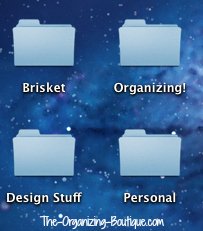
These are some of the general folders I have on my desktop.
• Remember, you want to find these files in the future with ease. Ask yourself how you would look for something and label the folder accordingly. For example, would you look for airline tickets under "Travel" or "American Airlines"?
• Once you have some general folders created, start dragging your documents to their appropriate locations.
•
If necessary, sort the documents in the general folders into further
categories by creating subfolders. For example, you may need to break
down the general "Travel" folder by vacation locations, airlines, and so
on.
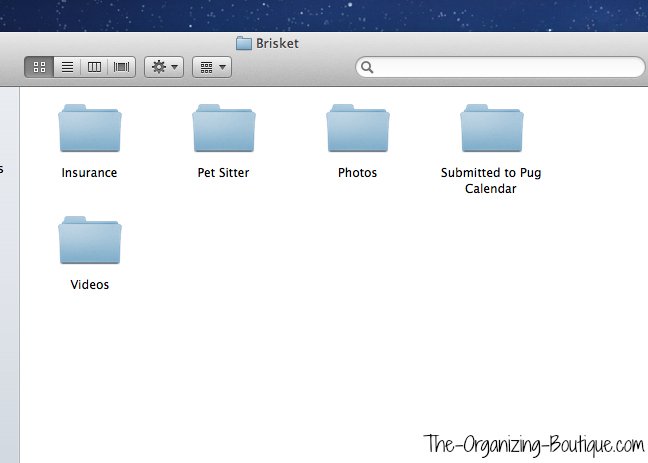
Inside the "Brisket" folder on my desktop are these subcategories (e.g. Insurance, Pet Sitter, Photos & Videos) for my dog's digital files. It's so easy to find any document I'm looking for!
MAINTAIN:
• Now that you have achieved computer system organization, get in the habit of putting documents in their appropriate folders as soon as you create or download them. This ten second task will save you so much time, confusion and stress.
• Be sure to backup computer files on a regular basis. My recommendation is to backup to an external hard drive as well as an off site service (like CrashPlan).
Organizing Computer Files: The Products
Here are some products to help with organizing office files and other documents on your computer. Enjoy!
Organize Your Digital Life: How to Store Your Photographs, Music, Videos, and Personal Documents in a Digital World


This book has good reviews on Amazon, so check it out!
Document Scanners
Get rid of the paper altogether and scan it in with one of these popular scanners.


You might also like these...
Computer Cable Organizer Products | Cord Organizers
Liberate yourself from the cord clutter chaos! Here are some fabulous office organization tips and product suggestions like computer cable organizer products.
How To Organize Passwords | Password Book
Wondering how to organize passwords? Check out these awesome ideas like a password book, cloud storage and more!
What Is Aweber | Best Email Marketing Service
What is Aweber anyway? In my opinion, it's one of the best email marketing service providers out there. Here's why.





GET UPDATES
MEET THE ORGANIZER

Hi and welcome to The Organizing Boutique! My name is Nealey, and it's lovely to meet you. Read more about me here.

New! Comments
Have your say about what you just read! Leave me a comment in the box below.